
Feed Pro
1. Introduction
INTRODUCTION
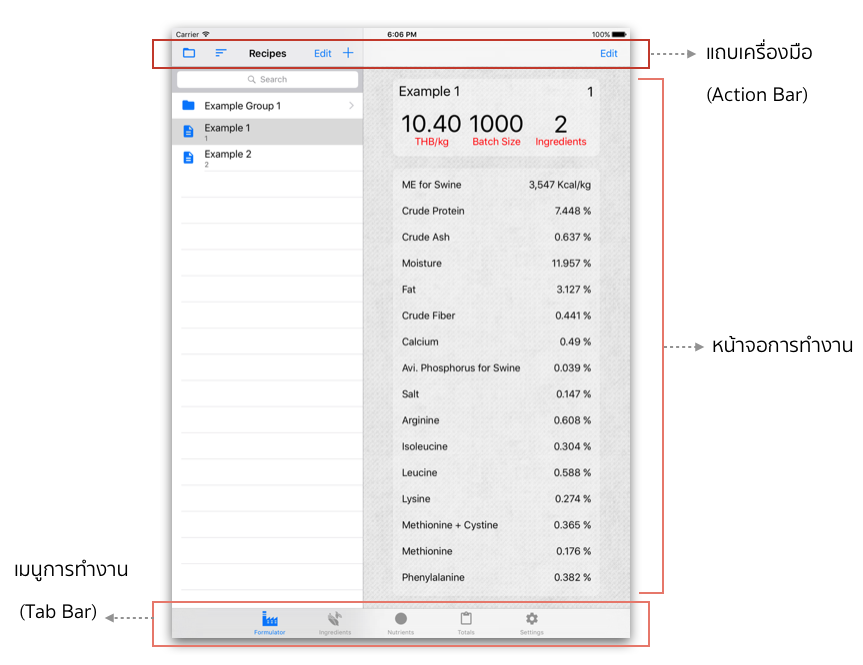
 Formulator tab contains "Recipes" on the action bar; where you can add/edit/search/copy/sort of create/manage group of the recipes.
2. Ingredients
Formulator tab contains "Recipes" on the action bar; where you can add/edit/search/copy/sort of create/manage group of the recipes.
2. Ingredients  Ingredients tab contains "Ingredients" on the action bar; where you can add/edit/search/copy/sort/report or create/manage group of the ingredients on the ingredient list.
3. Nutrients
Ingredients tab contains "Ingredients" on the action bar; where you can add/edit/search/copy/sort/report or create/manage group of the ingredients on the ingredient list.
3. Nutrients Nutrients tab contains "Nutrients" on the action bar; where you can add/edit/sort or report the list of nutrient data that will be applied for all formulas and ingredients.
4. Total
Nutrients tab contains "Nutrients" on the action bar; where you can add/edit/sort or report the list of nutrient data that will be applied for all formulas and ingredients.
4. Total Summary of each ingredient quantity and cost that used in formula for summary report and forecast purpose.
5. Settings
Summary of each ingredient quantity and cost that used in formula for summary report and forecast purpose.
5. Settings Setting of Language, Weight Unit, Currency Unit and Backup/Restore data.
TAB BAR
1. Formulator
Formulator tab contains "Recipes" on the action bar; where you can add/edit/search/copy/sort of create/manage group of the recipes.
2. Ingredients
Ingredients tab contains "Ingredients" on the action bar; where you can add/edit/search/copy/sort/report or create/manage group of the ingredients on the ingredient list.
3. Nutrients
Nutrients tab contains "Nutrients" on the action bar; where you can add/edit/sort or report the list of nutrient data that will be applied for all formulas and ingredients.
4. Total
Summary of each ingredient quantity and cost that used in formula for summary report and forecast purpose.
5. Settings
Setting of Language, Weight Unit, Currency Unit and Backup/Restore data.
ACTION BAR
- 1.
 Group organizing: to create/manage group.
 - 2.
 Sorting: to sort by name or code.
 - 3.
 Add data: to add new data.