
Feed Pro
8. Recipe Nutrient Specification
To setup nutrient constraint for optimal cost.
 1.2 Choose nutrients spec from the list.
1. ADD NUTRIENT SPECIFICATION
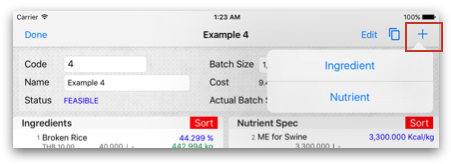
1.1 On Formulator view touch on "+" to choose Nutrient Specs into recipe.
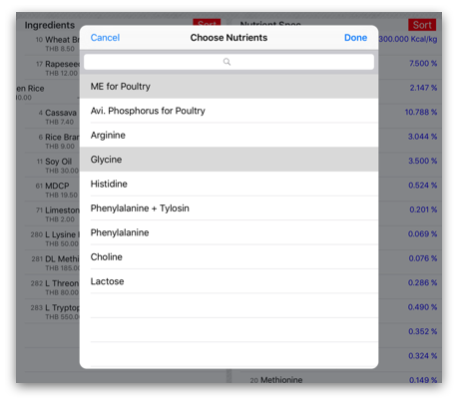
1.2 Choose nutrients spec from the list.
2. SPECIFY NUTRIENTS SPECIFICATION CONSTRAINT
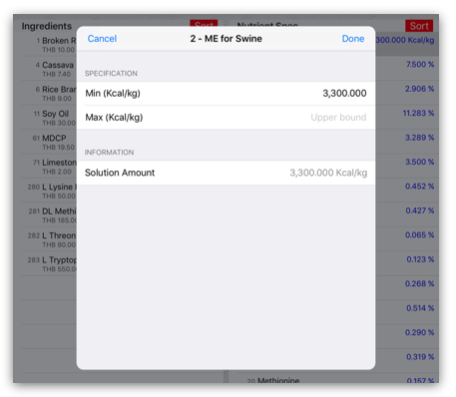
2.1 To specify constraint for each nutrient you can touch on nutrient row to input data describe as follow:2.1.1 Min - lower bound of nutrient spec. Example, Setting Min ME for Swine = 3,300 Kcal/kg then ME for Swine is not lower than 3,300 Kcal/kg
2.1.2 Max - upper bound of nutrient spec. Example, Setting Max Salt = 0.15% then Salt is not over than 0.15%
3. DELETE NUTRIENT SPECIFICATION
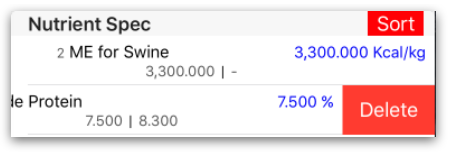
3.1 Slide-left on nutrient spec row to delete item, Then touch Optimize to re-calculate.